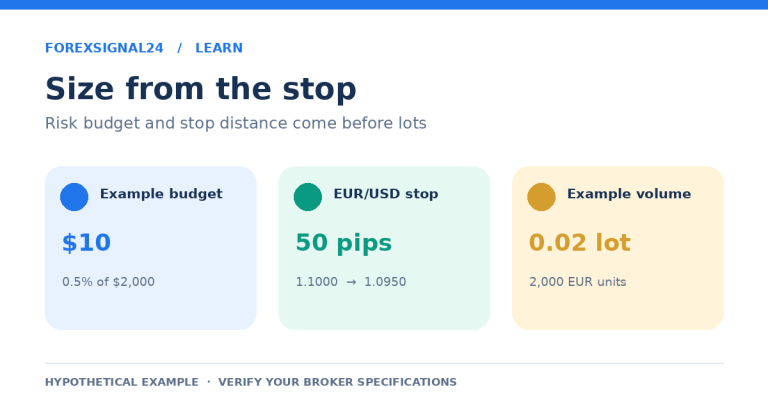
You have an entry in mind, a stop below the previous low, and enough money in the account to place the trade. Then comes the question that can change the whole setup: how many lots should you actually trade?
Typing 0.10 because it worked on the last trade is tempting. But a 20-pip stop and an 80-pip stop do not carry the same monetary risk at the same lot size. A position that looked modest yesterday can be much larger than intended today.
The ForexSignal24 Position Size Calculator works in the opposite direction: start with a chosen risk budget and the distance to your stop, then calculate the volume. This guide explains the fields, walks through the results, and shows what to check before copying a number into your trading platform.
All prices, exchange rates, account balances and trading conditions below are hypothetical. The 1% risk figures illustrate the arithmetic; they are not a recommendation or a guarantee of safety.
What the position size calculator actually does
The calculator estimates a trade size from the account balance you enter, your chosen risk percentage, the entry-to-stop distance, and the instrument’s contract specifications. It then rounds the lot size down to the volume step you specify, subject to your maximum-lot setting. When the minimum lot would exceed the risk budget, it returns zero rather than forcing a larger trade.
Its results also include the estimated stop-loss amount, gross target profit, reward-to-risk relationship, stop distance, and estimated margin. Those numbers answer different questions. The lot size describes your exposure; the stop-loss amount estimates a price-based loss; margin estimates the funds required to support the position.
This is a manual-input planning tool. It does not supply live quotes, retrieve your broker’s specifications, or send an order to a broker. The example values already on the page are starting points, not current market data. Treat the answer as an estimate built from your inputs, not an endorsement of the trade.
How to fill in the calculator
Choose the instrument and trade direction
Start with the relevant preset. The available choices include EURUSD, GBPUSD, USDJPY, GBPJPY and XAUUSD, alongside Custom specifications. Use Custom when you need to enter specifications for an instrument outside those presets, and review the fields again after switching instruments.
Select Buy or Sell to match the planned trade. For a new buy setup, the intended protective stop should be below entry and the profit target above it; for a new sell setup, reverse those relationships. Do not treat an absolute price-distance calculation as proof that the order levels make sense.
Set the balance and the risk budget
Enter the balance you want to use as the calculation base, then the risk percentage. A balance of 5,000 and a risk input of 1 means a monetary budget of 50 in the account currency. Enter 1 for 1%, not 0.01.
The calculator only knows the number you type. It does not inspect floating losses, existing positions or available equity. Where a trading plan uses current equity instead of account balance, that calculation base has to be entered manually; there is no account connection doing it for you.
The account-currency field is a label. Changing USD to EUR does not fetch an exchange rate or convert the figures automatically. The separate conversion field must also be correct.
Enter the planned entry, stop loss and take profit
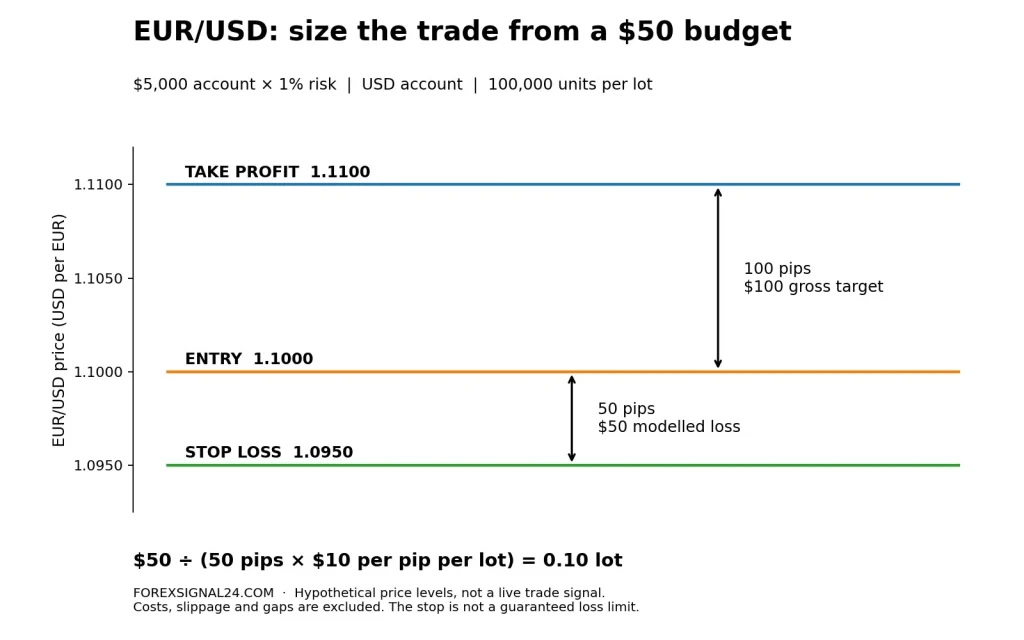
Use price levels in these fields, not pip distances. For example, enter 1.1000 as the EUR/USD entry and 1.0950 as the stop—not 50 in the stop-price field. With a pip size of 0.0001, those two prices are 50 pips apart.
The target lets you evaluate gross potential reward, but the stop distance determines the risk-based position size. Moving a target farther away does not create room for a larger position under the same risk budget. Moving the stop changes the calculation and requires a fresh result.
Check the contract, pip size and volume limits
Contract size tells the calculator how many units one lot represents. Pip size defines the price change being counted as one pip. Volume step determines the permitted lot increments, while minimum and maximum lot settings define the range you want the calculator to respect.
In the EUR/USD examples below, one lot represents 100,000 units, the pip size is 0.0001, the volume step and minimum are both 0.01 lot, and the maximum is 100 lots. These are stated assumptions, not universal specifications. In MetaTrader 5, open Market Watch, right-click the symbol and choose Specification to check the broker’s values. MetaQuotes explains these fields in its official symbol-specification documentation.
A platform point is not necessarily a pip. For the conventions used in this guide, a move from 1.10000 to 1.10010 is one pip, although it spans ten increments of 0.00001. The guide to forex pips, lots and pip value explains the distinction before you apply it to position sizing.
Get the conversion direction right, then enter leverage
The conversion field asks how much one unit of the instrument’s quote currency is worth in your account currency. The quote currency is the second currency in the pair. EUR/USD is quoted in dollars; EUR/JPY is quoted in yen.
For EUR/USD in a USD account, use 1. For a yen-quoted pair in a USD account, enter the dollar value of one yen—not the yen value of one dollar. A worked example appears below. You can also use the Pip Value Calculator to cross-check the monetary value of a pip with the same specifications.
Enter leverage as the denominator of the ratio: 100 represents 1:100. This feeds the simplified margin estimate; it does not change the loss generated by a fixed lot size over a fixed price distance. Review all fields, calculate, and recalculate after any input changes.
The calculation behind the lot size
The underlying calculation is easier to follow when the stop distance is expressed as a price difference:
Risk budget = balance × risk percentage ÷ 100
Loss per lot = |entry price − stop price| × contract size × conversion
Raw lots = risk budget ÷ loss per lot
Here, conversion means account-currency units per one unit of quote currency. The vertical bars mean the absolute difference between the two prices. Do not insert a stop distance measured in pips into the second line without also accounting for pip size.
The equivalent pip-based version is lots = risk budget ÷ (stop distance in pips × pip value per lot). Under the EUR/USD assumptions above, the pip value of one lot is 100,000 × 0.0001 × 1, or $10. A 50-pip stop therefore represents $500 of price-based loss per full lot.
The calculator converts the raw result into a permitted volume using your step and limits. That rounding matters: a theoretical answer is not always an order size your broker accepts. For a deeper explanation of the underlying method, see Forex Position Size from a Stop Loss.
Four worked examples
1. A $5,000 EUR/USD account with a 50-pip stop
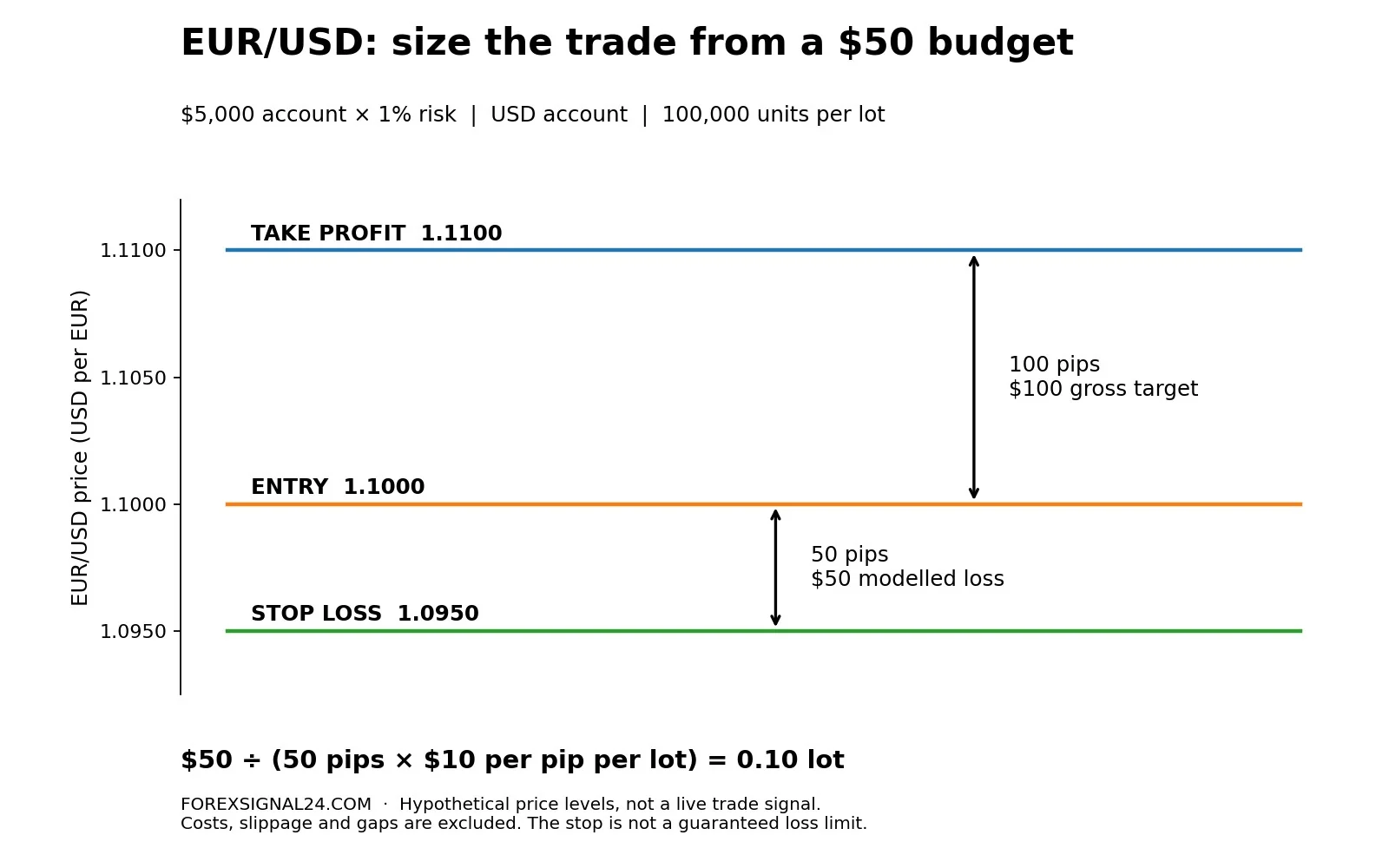
Suppose you are planning a EUR/USD buy at 1.1000, with a stop at 1.0950 and a target at 1.1100. Enter a USD balance of 5,000 and risk of 1%. Use the EUR/USD specifications described above, conversion of 1, and hypothetical leverage of 1:100.
The budget is $50. The stop is 50 pips away, and each full lot would lose $500 across that distance before costs. Dividing $50 by $500 gives 0.10 lot. At that volume, each pip is worth $1 under these assumptions.
| Calculator result | Value | What it tells you |
|---|---|---|
| Calculated position | 0.1000 lots | The volume derived from the inputs |
| Risk budget | 50.00 USD | The chosen monetary allowance |
| Estimated stop-loss amount | 50.00 USD | Price-based loss at the entered stop |
| Gross target profit | 100.00 USD | Price-based gain at the entered target |
| Reward / risk | 1 : 2.00 | $2 of gross reward per $1 of modelled risk |
| Stop distance | 50.00 pips | The entry-to-stop distance |
| Estimated margin | 110.00 USD | The simplified margin requirement at 1:100 |
The interface labels the ratio “Reward / risk” while displaying 1 : 2.00. Read the underlying amounts: $50 of modelled risk against $100 of gross potential reward. That is a risk-to-reward ratio of 1:2, not a probability of winning.
2. The same budget, but a wider stop
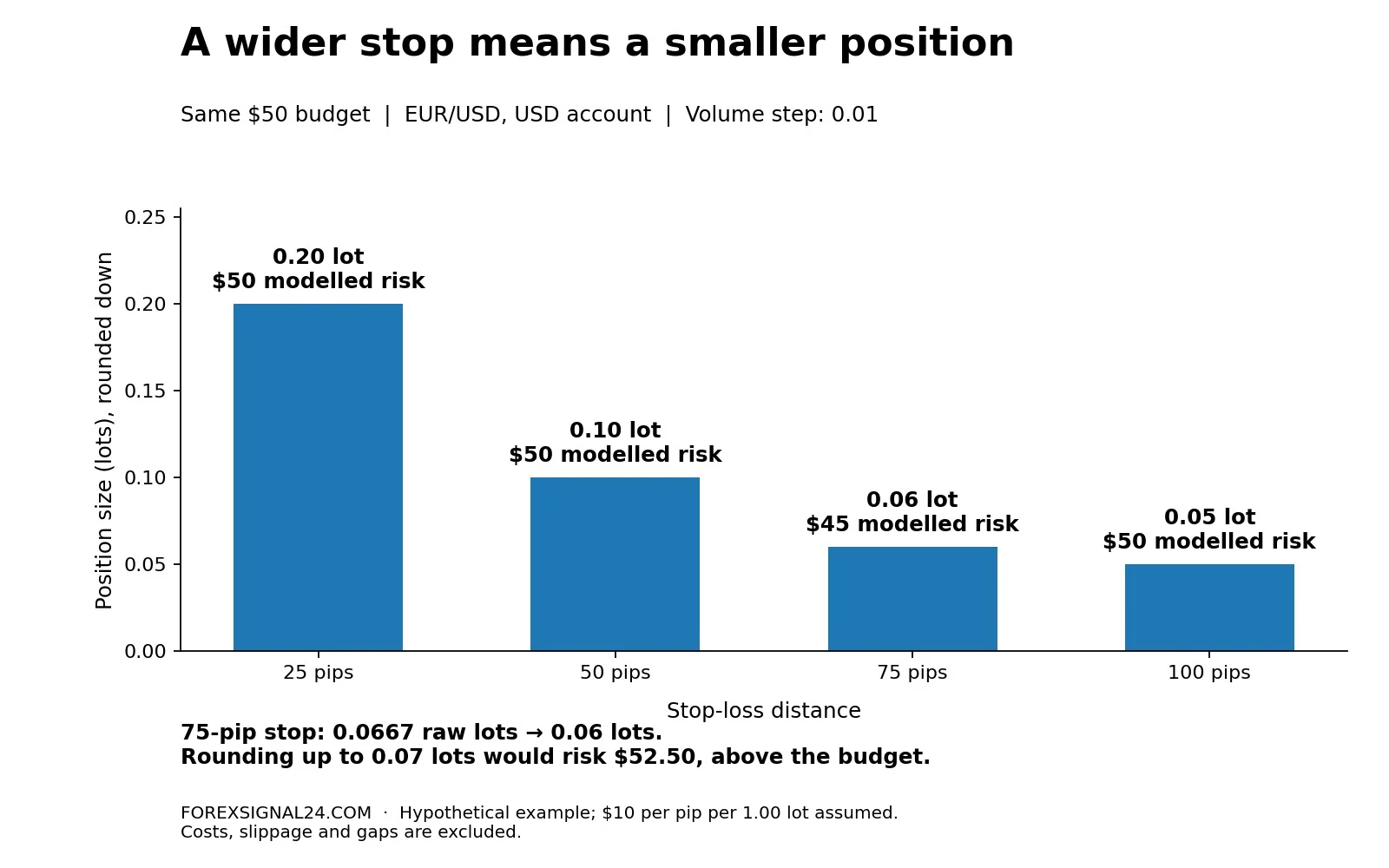
Keep the account and risk percentage unchanged, but move the stop to 1.0925 and the target to 1.1150. The stop is now 75 pips from entry. Raw volume becomes $50 ÷ (75 × $10), or approximately 0.06667 lot.
With a 0.01-lot step, the calculator rounds down to 0.06 lot. Estimated stop-loss exposure is $45 and gross target profit is $90. The result deliberately leaves $5 of the budget unused; rounding up to 0.07 lot would produce $52.50 of price-based risk.
Keeping the old 0.10 lot instead would raise the modelled loss to $75. Nothing about the account balance changed. The wider stop alone increased the exposure, which is why copying a lot size from a previous trade can be misleading.
3. A yen-quoted trade in a dollar account
For a separate example, choose Custom specifications for EUR/JPY. Assume a $3,000 account, 1% risk, a sell entry at 165.00, a stop at 165.50 and a target at 164.00. Use a 100,000-unit contract, pip size of 0.01, and volume step and minimum of 0.01 lot.
Now assume, purely for the calculation, that 1 USD = 160 JPY. The conversion input is therefore 1 ÷ 160 = 0.00625 USD per JPY. Entering 160 in this field would reverse the conversion and invalidate the result.
The stop is 50 pips away. One full lot would lose 0.50 × 100,000 = ¥50,000, equivalent to $312.50 at the assumed conversion. The $30 budget allows 30 ÷ 312.50 = 0.096 raw lots, rounded down to 0.09 lot. That gives approximately $28.13 of price-based stop exposure and $56.25 of gross target profit.
These are calculations using a fixed hypothetical exchange rate, not live yen values. Actual conversion can change before the position closes. Update the input when planning a real order instead of carrying the example rate forward.
4. When the calculator returns zero lots
Return to the first EUR/USD setup, but reduce the balance to $100 while keeping the risk input at 1%. The budget is now $1. A 50-pip stop requires a theoretical volume of 0.002 lot, below the assumed minimum of 0.01.
The minimum permitted position would carry $5 of price-based stop exposure, five times the chosen budget. The calculator’s documented response is zero. That is useful information: this combination of account size, stop distance and contract limits does not fit the stated plan.
Do not increase the risk percentage merely to make an order possible. Review the broker’s actual minimum size, reconsider whether the setup belongs in the account, or leave the trade alone. Narrowing a stop solely to obtain a non-zero lot size changes the trade rather than solving the original sizing problem.
Before using the result in a real order
Separate margin from stop-loss risk. In the first example, $110 is estimated margin while $50 is the modelled loss at the stop. Under the same simplified model, moving from 1:100 to 1:200 would halve the margin estimate to $55, but would not halve that $50 loss at a fixed 0.10 lot. The leverage values here illustrate a formula, not the leverage available for every account.
Actual requirements can depend on instrument settings, margin rates, existing positions and the broker’s calculation method. MetaQuotes’ margin calculation documentation explains why a platform’s final requirement may differ from a simple estimate. Use the Margin Calculator as a planning cross-check, then verify available margin in the trading platform.
Allow for costs and imperfect execution. The position-size estimate does not add a separate allowance for commissions, financing, slippage or gaps. For illustration, a $7-per-lot round-trip commission would cost $0.70 on 0.10 lot; a $50 price-based loss would then become $50.70 before other adjustments. The Spread & Commission Calculator helps estimate explicit spread and commission costs. Keep the price basis consistent: do not count the same spread twice when executable entry and exit prices already include it.
A normal stop-loss should not be treated as a guaranteed execution price. Market conditions can produce a loss larger than the intended amount, a limitation reflected in the CFTC’s published risk-disclosure text. The CFTC and NASAA’s forex investor alert also stresses that currency trading can be extremely risky even through a reputable dealer. A correct formula does not remove that risk.
Check the rest of the account. This is a single-trade calculator, not a portfolio risk engine. Three separate trades budgeted at $50 each represent $150 of planned stop exposure in aggregate before execution differences and costs. The tool does not assess how those trades may move together.
Gold needs its own specification check, too. Do not carry the EUR/USD assumption of $10 per pip per full lot into XAUUSD. Use the XAUUSD Lot Calculator with the broker’s ounces-per-lot specification, supported by the gold contract-size and stop-distance guide.
Frequently asked questions
Does the calculator use live prices?
No. Prices, conversion rates and specifications are manual inputs. The page’s example values are not a live market feed, and changing the currency label does not update the conversion rate.
Why is the calculated risk lower than my budget?
Rounding down to the volume step can leave some of the budget unused. A maximum-lot cap can also reduce the volume. In the 75-pip example, 0.06 lot risks $45; the next step would exceed the $50 budget.
Does higher leverage let me use a larger lot at the same stop-loss risk?
Not when the account base, risk budget, stop distance and contract inputs remain unchanged. Higher leverage changes the simplified margin requirement. Increasing the lot size still increases the monetary effect of a given price move.
Is the result a recommended trade size?
It is the mathematical output of the assumptions you supplied, not personalised advice. The calculator does not decide whether the stop is appropriate, whether the market setup is sound, or whether you can afford the loss.
Make the position fit the trade
Before placing an order, check that the instrument, trade direction, entry, stop and specifications match the intended setup. Recalculate after the last change, compare the estimated loss with your budget, and confirm costs and margin separately. Copy the lot size only after those checks agree.
The useful habit is not finding a favourite lot size. It is giving each trade a fresh calculation. Open the Position Size Calculator, enter a hypothetical setup, then widen the stop without changing the budget. Watching the permitted volume shrink makes the relationship clear.
Educational information only, not personalised investment advice. Forex and leveraged trading involve a substantial risk of loss. Calculations depend on manually entered assumptions and do not guarantee execution, profitability or a maximum loss.