On this page
A gold chart tells you where price has been. Reading the session, the level it challenged, and how a candle closed is the harder part. Gold Session Liquidity Free brings those observations together for MetaTrader 4 and MetaTrader 5: completed Asian trading ranges, swing-based liquidity sweep markers, market structure breaks, session context and a manual risk-planning panel.
Designed for chart study rather than automatic trading, this free indicator helps XAUUSD traders ask more precise questions before constructing a trade idea. It does not read institutional order books, promise winning entries or place trades. Its source is publicly available so you can inspect the logic yourself.
Download Gold Session Liquidity Free
Current documented release: v1.10. Choose the file for your own terminal. These are separate MQL4 and MQL5 implementations; neither can be installed interchangeably.
MetaTrader 4
Free source: Gold_Session_Liquidity_Free_MT4.mq4
MetaTrader 5
Free source: Gold_Session_Liquidity_Free_MT5.mq5
Both Code Base submissions passed automated validation with zero errors at publication. Compilation and platform validation do not demonstrate trading profitability or accuracy of every broker-specific risk estimate.

What the indicator actually shows
The Free edition focuses on market intelligence and manual planning, not a stream of instant buy or sell instructions. On a gold chart you can observe:
- Completed Asian range: historical Asian High and Low levels from your configured UTC session window, available after the range has finished.
- Liquidity sweeps: closed-candle price penetrations and reclaims or rejections of confirmed swing levels. These are OHLC-derived patterns, not direct measurements of resting orders.
- Confirmed swing breaks: separate structure-break markers when a closed candle crosses a previously confirmed swing level under the indicator rules.
- Trading session context: Asia, London, New York and overlaps, using broker clock inputs and daylight-saving estimates.
- Trend context: informational EMA fast/slow direction on the selected higher timeframe (H1, 20/50 EMA by default).
- Dashboard and risk planner: informational context and manual hypothetical entry, stop, budget and position-volume calculations.
These elements answer different questions. A sweep describes how a candle reacted to an earlier level. A structure break describes what happened to a confirmed pivot. A session label explains when it happened. None of them alone tells you whether a trade is appropriate.
How the Gold Session Liquidity logic works
1. Establish a completed session range
For the default Asian window, the indicator observes the price range from 00:00 to 06:00 UTC. It draws the relevant historical High/Low only after the configured window has ended. A still-forming Asian session is not retroactively presented as a completed range.
Market hours are derived from historical server timestamps using BrokerClock, BrokerWinterUTCOffsetHours and the session configuration in MT5. MT4 has similar broker-offset inputs but a different implementation. Review those settings against your actual broker before interpreting the lines.
2. Confirm the swing before evaluating a sweep
The default SwingStrength is 3. A swing pivot therefore needs bars on both sides to confirm it. For an eligible high, a candidate candle must trade sufficiently above the earlier swing high and close back below the level; a low-side sweep uses the inverse condition. Extra filters consider the rejection wick and penetration distance.
Minimum penetration = max(fixed symbol-point threshold, volatility-based threshold)
Gold has broker-specific tick and point conventions. A fixed number of points is not interchangeable with the same number of forex pips across instruments. This is one reason the indicator should be reviewed on the actual broker feed.
3. Assess the subsequent structure independently
The chart can display a separate swing-break marker when price closes beyond a confirmed structure level. Do not assume a highlighted sweep automatically means a profitable reversal. A rejection may fail, a breakout may continue, and the higher-timeframe context can conflict with the local price action.
4. Keep the unfinished candle out of historical signal confirmation
Closed-candle and confirmed-pivot logic helps avoid provisional intrabar signals. It does not justify an absolute “never repaints” claim: revised broker history, changed settings or a newly loaded historical window may cause historical overlays to be recalculated.
Actual screenshots from MetaTrader 5
The following are genuine screen captures made by MetaTrader 5 itself from a MetaQuotes-Demo XAUUSD chart on 20 November 2026, using the compiled Gold Session Liquidity Free MT5 v1.10 indicator. They display actual candle data, indicator buffers and chart markers. They are not reconstructed images and do not show an executed trade or a tested profit result. The dashboard panel is not included in these particular captures.
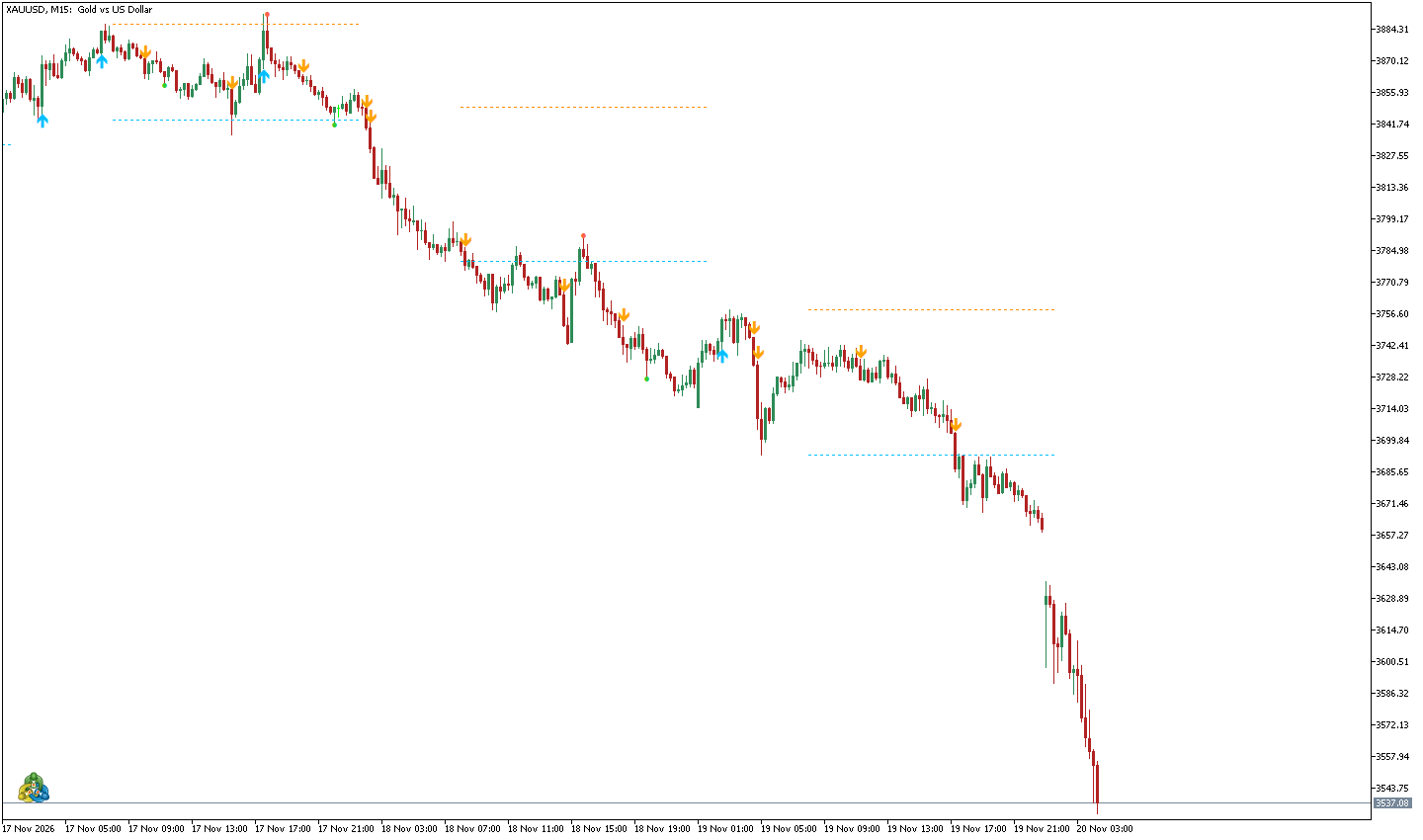
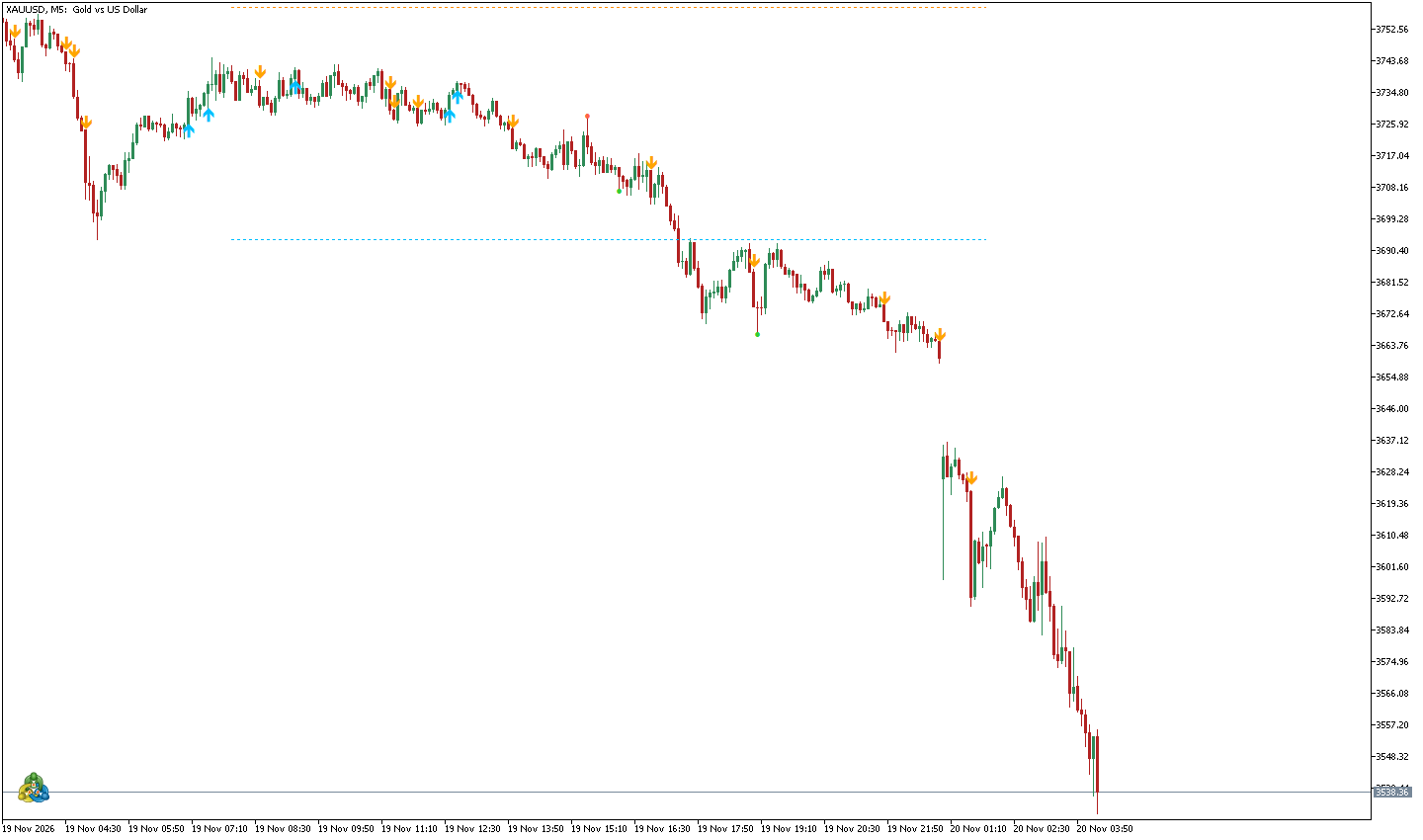
These captures are specifically from MT5. The MT4 edition is distributed separately and may show different markers because its underlying implementation and broker-data API are not identical.
MT4 versus MT5: what is different?
| Feature | MT4 Free | MT5 Free |
|---|---|---|
| Source language | .mq4 / MQL4 | .mq5 / MQL5 |
| Asian range and session context | Included | Included |
| Closed-candle sweep and swing-break overlays | Included | Included, with additional filtering |
| Manual risk planner | Included; independently verify lot conversion | Included; independently verify broker values |
| Published data buffers | 6 | 17 |
| Experimental research signals | Not included | Optional, OFF by default, not performance-validated |
| Automatic order execution | No | No |
The editions serve similar educational goals but do not have byte-identical algorithms, output-buffer layouts or risk-calculation APIs. Do not assume their markers match candle for candle.
Important settings and default values
Start with the defaults on a demo chart. Adjust one group at a time while keeping the same historical feed and timeframe for comparisons.
| MT5 input | Default | Explanation |
|---|---|---|
AsianStartUTCHour / AsianEndUTCHour | 0 / 6 | Start and end of the Asian session range in UTC, end exclusive. |
BrokerWinterUTCOffsetHours | 2 | Example winter UTC offset. It must match the broker’s server clock. |
SwingStrength | 3 | Bars on either side needed to confirm a pivot. |
MaxSwingAge | 90 bars | Maximum lookback for the reference swing. |
MinSweepPoints | 10 | Fixed minimum level penetration measured in broker symbol points. |
MinSweepToATR | 0.10 | Volatility-based minimum sweep component. |
MinRejectionWickPct | 20% | Minimum rejection wick as a share of candle range. |
TrendTimeframe | H1 | Higher-timeframe EMA context (fast 20, slow 50 by default). |
MaxBarsToScan | 900 | Bounded number of historical bars used for displayed analysis. |
ShowDashboard | true | Show the informational panel, separate from the screenshot captures above. |
ShowExperimentalSignals | false | Unvalidated research option, not enabled in the free default. |
RiskBudgetPercent | 0.50% | Example equity-based manual planning budget, not a recommended risk level. |
MT4 uses comparable inputs such as BrokerWinterUTCOffset, AsianStartUTC, SwingStrength, ATRPeriod, MinWickPercent and RiskBudgetPercent, but the full configuration and filtering logic differ. Consult the source files for exact behavior.
Manual risk planning: position size is only an estimate
Price action is one part of the decision. A trade idea also needs a defined invalidation level, position size and realistic execution costs. The manual planner lets you enter hypothetical entry and stop prices, an optional target, a risk percentage and an estimated round-trip commission per lot.
For example, with hypothetical account equity of USD 10,000 and a 0.5% planning budget, the nominal budget is USD 50. The lot estimate still depends on the broker’s XAUUSD tick value, tick-size convention, contract size and volume steps. The indicator should not invent a lot size if the broker data is unavailable.
Important MT4 v1.10 caution: its tick-size/tick-value conversion has not been independently verified across broker contract specifications. Cross-check any proposed volume using a separate, broker-aware calculator before relying on it. In either platform, a planned stop is not a guaranteed maximum loss: spread expansion, slippage and market gaps can exceed your model.
For an independent calculation, see the XAUUSD Lot Calculator and Position Size Calculator.
How to install Gold Session Liquidity Free
- Choose your platform. Download the
.mq4source for MT4 or.mq5source for MT5 from the official links above. - Open the data folder. In MetaTrader desktop select File → Open Data Folder.
- Copy the source. Place the file under
MQL4/IndicatorsorMQL5/Indicators. You may create aGoldSessionLiquidityFreesubfolder. - Compile. Open the source in the corresponding MetaEditor and press F7. Confirm there are no compilation errors.
- Refresh Navigator. In the terminal, refresh Indicators and attach Gold Session Liquidity Free to your XAUUSD chart on a demo account.
- Check session and broker parameters. Verify UTC server offset, DST behavior, price-point specifications, swing filters and manual risk inputs before interpreting the output.
The indicator is a chart study tool. It does not need external DLLs and does not require automatic trading to be enabled for its analytical calculations.
A practical 5-step chart-review workflow
- Open XAUUSD on a demo terminal and confirm the broker session clock matches the configured UTC settings.
- Note the most recently completed Asian High and Low; do not treat a still-forming range as final.
- Wait for closed candles and inspect any qualifying sweep relative to a previously confirmed swing reference.
- Review subsequent structure, higher-timeframe EMA context and active market session. Record the reasons a hypothesis could be wrong.
- Specify a hypothetical entry and stop, verify lot sizing independently, and log the observation without automatically entering a trade.
This workflow helps you collect consistent observations. Whether a configuration has a durable trading edge requires separate, realistic, out-of-sample research that includes costs, slippage and adverse market conditions.
Behavior, data caveats and limitations
- No institutional liquidity feed. The sweep label describes an OHLC price pattern, not actual stop orders or execution volume at a venue.
- No automated trade entry. This is not an EA; the default build offers market context and manually configured planning, not a verified signal service.
- Closed-bar confirmation is not a profitability claim. Confirmed pivots add intentional delay and can look different after broker history revisions.
- Feed-dependent and broker-dependent. Prices, spreads, server clock, DST, contract specifications and loaded history may change visible markers and estimates.
- Risk remains real. Theoretical stop distance and money-risk models cannot bound actual losses during gaps and slippage.
- Screenshot scope. Both images on this page are captured from a running MT5 demo terminal, not MT4 screenshots and not trading results.
As with any open-source trading tool, review the code and test the output on a practice account before deciding how it fits your workflow.
Frequently asked questions
Is Gold Session Liquidity Free really free?
Yes. The MT4 and MT5 sources are available through the official MQL5 Code Base releases and a public GitHub repository.
Does it give profitable buy and sell signals?
No profitability has been established for these releases. This Free product is analysis-first. MT5 exposes an optional experimental research setting that is disabled by default; it is not an independently verified trading signal product.
Why do the MT4 and MT5 charts differ?
The two editions have distinct implementations and buffer mappings. Broker price history, platform APIs, timeframe and settings can also change where a marker appears.
Can it be used on other symbols or timeframes?
Its calculations can initialize on various symbols and chart timeframes, but the defaults are designed for intraday gold analysis examples. Check point sizes, clock settings and data characteristics before using other instruments. M5/M15 are not performance-optimized recommendations.
Why does a completed session line appear after the session ends?
A final session High/Low cannot be known before the session has completed. Waiting for the end avoids treating an unfinished price range as confirmed historical information.
Source code, references and related tools
These are the publisher’s project links and user guides. Version information on external repositories may change independently, so use the official Code Base links above when choosing a release.
- GitHub — Gold Session Liquidity Free MT4 & MT5 source and MQL5 Algo Forge repository.
- ForexReview.top — full illustrated English user guide.
- DasarForex.top — Indonesian installation and feature guide.
- Smart Liquidity Hunter for a separate closed-candle swing-sweep study tool.
- Forex Market Sessions, XAUUSD Lot Calculator, Risk / Reward Calculator, and Spread & Commission Calculator for related manual checks.
Publisher and attribution: FXLINER / ForexReview.top. Some swing/pivot logic includes MIT-licensed work derived from Smart Liquidity Hunter; preserve THIRD_PARTY_NOTICES.txt when redistributing source. This page describes an educational tool, not personalized investment advice.